post on fenyo.net] For some years, I lodge different pets at home (Cat, Chinchilla, Hamsters).
Each time I tried to phone one of them, I was unable to understand what he said : I tried but never succeeded in teaching any human language to them. So, I created this motorized Camera controlled by the telephone, in order to supervise them when I'm at my office.
The system is made of 3 parts:
* 1- a private PBX based on Asterisk: this Linux PC is connected to the PSTN. When it receives a phone call, it converts DTMF signals to commands sent into an asynchronous V.24 interface (RS-232-C),
* 2- an electronic box based on a micro-controller that receives commands from a V.24 interface and is able to drive a motor (stepper),

* 3- an USB camera attached to the stepper, broadcasting to the Internet.
The command part of the box is based on a microcontroller (Microchip PIC16F876) connected to my personal PBX (PC running Asterisk) through a serial port (thanks to the well-known MAX232N, a +5V-powered RS-232 driver). The power part is made of a quadruple half-H driver (L293D from Texas Instruments) driven by 4 inverters packaged in a SN7416.
Here are the schematics:
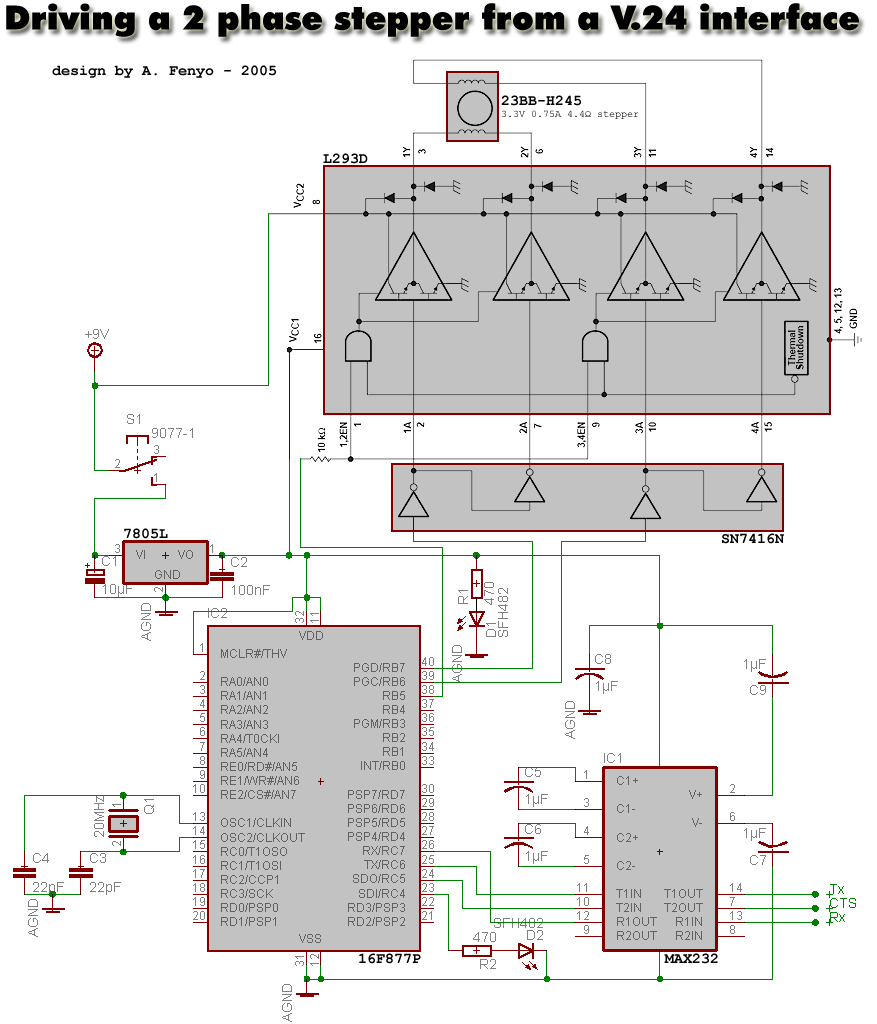
command part | power part |
 camera part |  stepper part |
 SN476 + L293D both from Texas Instruments |


What about the software parts ?
- The assembler code for the PIC is available here.
- In your PBX dial plan (Asterisk configuration file extensions.conf), you need to add the left and right actions (in this example, press 7 and 8 to let the camera rotate left and right):
; stepper
exten => 7,1,System(/bin/stepper-left-digium.sh)
exten => 7,n,Goto(s,begin)
exten => 8,1,System(/bin/stepper-right-digium.sh)
exten => 8,n,Goto(s,begin)
- These shell scripts call /bin/stepper (see stepper.c).
Realmente si se tuviera el equipo valdría la pena probarlo
